For independent and wholesale food distributors · AI-native ERP + B2B ecommerce
Food distribution software. From order to invoice, one system.
Bring customer ordering, inventory, delivery and finance together. AI drafts the work. Your team approves what moves money or stock.
What is Foodline AI? Food distribution software for wholesale food distributors: one AI-native system for customer ordering, inventory and lots, catch weight, routes, invoicing and the general ledger. It replaces QuickBooks, the legacy ERP and the separate ordering app, with AI included and no per-user fees.
- Replaces QuickBooks, the legacy ERP and the separate ordering app
- Migration in 3 to 4 business days on clean data
- Guided implementation in 35 or 75 days
Interactive product preview below · sample data
Interactive preview: sample data showing how Foodline Autopilot works. Not the live product.
Nothing sends, posts, or changes without your approval.The AI-native ERP and B2B ecommerce platform for food distributors
RECORD
Foodline AI is the most modern ERP and B2B ecommerce platform for independent food and beverage distributors. Your customers order from your branded online store, and the same AI-native system runs purchasing, inventory and lots, the warehouse, delivery, invoicing and the general ledger. Routines draft the day's work. A person approves anything that moves money or stock. Foodline AI replaces QuickBooks, including financial statements and bill pay.
Foodline AI at a glance: 11 areas · 60+ modules · one login · 6 routines · 31 read-only operational reports · data migration in 3–4 business days on clean data · guided implementation of 35 or 75 days · built for distributors doing ~$5M–$500M · month to month · built in Atlanta, GA.
Most food distributors pay for an ERP and a separate ordering app, then key orders between them by hand. Foodline AI is B2B ecommerce and a modern autonomous ERP in one system: your customers order online, the ERP does the work, and you just approve it.
Ecommerce and ERP run in one system. Your people approve what moves money or stock.
Customer apps for iOS and Android are coming soon. Drivers and warehouse teams already work in the Foodline mobile app.
Stop paying for an ERP and a separate ordering app.
Your customers order online, and the same system runs purchasing, inventory, the warehouse, delivery and invoicing. Nothing to sync, nothing to re-key, and one vendor to call.
The usual setup
- An ERP for the back office
- A separate ordering app or portal for customers
- An integration, or a person, copying orders, prices and stock between them
- Two contracts, two logins, two places for things to go wrong
With Foodline AI
- Your branded online store runs on the ERP record
- Online orders arrive ready to pick, with no import and no re-keying
- Stock, credit and cutoff are checked before an order is accepted
- One vendor, one login, one record from order to invoice
A storefront connected to your operation.
Customer pricing and product information live alongside the order. Your team starts with the same record the customer created.
Explore B2B ecommerce- Customer
- Harbor Kitchen
- Order
- SO-1042
- Delivery
- Thursday · morning
- Romaine hearts12 cases
- Roma tomatoes8 cases
- Fresh basil4 cases
Keep every delivery connected to the order.
Loads, delivery windows, proof of delivery, and customer changes stay in the same live record. Your dispatch team sees the route. Your finance team sees the outcome. Nobody has to reconcile two systems after the truck comes home.
Route planning software for food distributors → Proof of deliverySigned at stop 6 of 11Route rebalancedStop 7 moved ahead of stop 5, 14 min saved
Disconnected systems cost you time and margin.
A green-screen ERP from 1998. A spreadsheet for the order guide. A separate portal for e-commerce. QuickBooks. A shared inbox for vendor price sheets. And one person who knows how it all fits together. That person is, right now, on holiday.
Every hand-off between those systems is a place where money leaks: a short that never got credited, a lot that expired in the cooler, an invoice that aged past 60 days because nobody chased it.
Turn daily exceptions into work ready for approval.
Think of a lighthouse keeper who never sleeps. Overnight it reads every order, every arrival, every lot date and every unpaid invoice. By 6:00 AM it has written the day's plan and put the three things that actually need a human decision on top of your screen.
 Foodline AIunder the hood
Three steps. That's the whole idea.
Why this matters: Foodline AI is built so the machine does the typing and the human keeps the authority. Your team reviews prepared work instead of building every draft from scratch. People keep control of what gets approved.
This is your building. Foodline AI is in every room.
The dock, the racking, the floor and the office are four different jobs on four different systems in most distribution businesses. Here they are four views of the same live record. When a pallet is short at the dock, the credit, the reorder and the customer's substitution all already know about it.
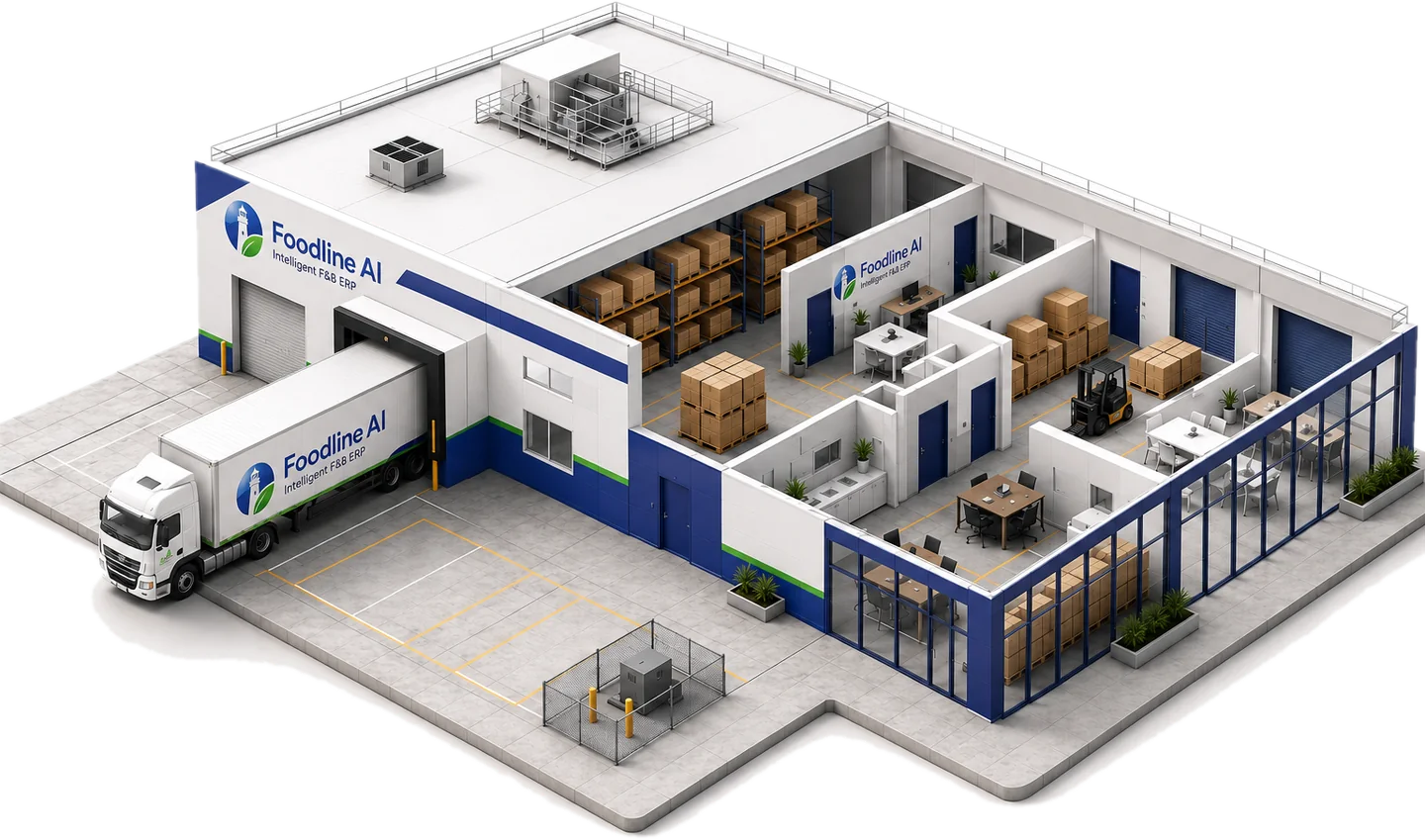 The dockReceiving, shorts, vendor claimsThe rackingLots, FEFO, expiry, cycle countsThe floorWave picking, load planning, routesThe officeOrders, pricing, A/R, period close
Food distribution software for the details generic systems miss.
Catch weight, lot control and expiry dates
A case count does not tell the whole story when the product is sold by actual weight. Your team needs to carry the measured weight through receiving, inventory and invoicing, while retaining the lot that identifies where the product came from. Foodline AI connects those records with warehouse work, so weight and traceability do not become a second spreadsheet.
For short-dated stock, the lot date matters as much as the quantity on hand. FEFO picking prioritizes the stock that expires first; the expiring-stock promotion routine prepares a promotion for review while there is still time to move it.
The customer promise and the delivery behind it
Foodservice customers order against their own prices, order guides and delivery schedules. Those promises need to reach the warehouse and dispatch team with the order. Connecting customer ordering, stock and route context gives the team one place to review an exception instead of reconciling a portal, a spreadsheet and a route sheet.
The same operational questions matter across broadline, produce, meat and seafood distribution, but the mix of weights, shelf life and handling requirements changes. Review the workflow that matches the products your business actually moves.
Work the ERP does on its own.
Every routine tells you four things before you switch it on: what starts it, when it runs, what it produces, and who has to approve it.
Promotion FEFO/FIFO
Finds overstock and stock nearing its expiry date, in FEFO/FIFO order, and suggests promotions to move it.
In plain English: Food that expires in the cooler is money you already paid for. This finds it while there is still time to sell it.
One ERP for the whole distribution business.
The autonomy is the point. This is what makes it possible: operational areas built for how food actually moves, not generic wholesale software with produce bolted on. Purchasing, inventory, warehouse, sales and finance share the same operational record.
Purchasing
Vendors, purchase orders, receiving, discrepancies with SLA clocks, and order guides built from live movement.
Inventory
Items, FEFO/FIFO lot control, traceability, recall drills, transfers, cycle counts, reorder alerts.
Warehouse & Delivery
Multi-location balances, handheld scanner work, FEFO wave picking, route load planning, and a driver app with proof of delivery.
Sales
Orders, invoices that can never be silently edited, shorts and backorders with substitutes, credits, B2B storefront.
Marketing (add-on)
Campaigns tied to SKUs, case movement, gross profit and co-op dollars. Content calendar, engagement inbox.
Customers
One profile instead of seven legacy tabs. Price levels, customer specials, bids, quantity breaks, A/R.
Finance
Accounts payable three-way match, treasury tie-out, balanced GL batches, period close, separated approval queue.
Insights
Curated dashboards, 31 operational reports that never write data, demand planning, and a shared glossary.
Human Resources
The certifications that keep trucks legal, tracked for every driver, selector and buyer. Recruiting, postings and the applicant pipeline come with the Recruiting add-on.
Admin & AI Copilot
AI consumption metering, users and roles, master data quality, integrations, QuickBooks migration import, audit log, and the Copilot itself.
Know a distributor that should see this?
Operators, consultants, implementation specialists, and food-industry friends can introduce the right people to Foodline AI. We will give you a clear way to make the connection and keep you in the loop.
Explore the operator community →Make an introduction that matters.
We start with the product and the fit. If Foodline AI can genuinely help, we handle the walkthrough, migration plan, and pilot from there.
Built for trusted industry relationshipsIt learns how you already work, then suggests the routine.
Every module has a standard operating procedure, whether or not anyone has written it down. Foodline AI watches how your team and your customers actually use the platform, and starts recommending routines that match the way the job is really done, instead of the way a manual said it should be.
That is the goal: technology that adapts to your business, rather than a business reshaped to fit the software.
Enterprise-grade security, compliance & control
Foodline AI is built for the operational realities of food distribution, including inventory, lot control, routes, customer terms, and approvals.
Authentication and session security are handled by WorkOS, with role-scoped permissions, SSO and enforced MFA. Every tool result and human decision is written to an immutable audit log.
Posted invoices and inventory movements can never be silently edited. Corrections happen as linked reversals, so the chain always reconciles.
Replace the workarounds with a migration you can review.
Start with the records your team relies on
A useful migration starts with your item catalog, units and packs, customer pricing, vendor records, open orders and balances. Agree which history needs to move, identify duplicates and missing fields, and test representative orders before deciding on a cutover. The goal is a usable operational record, not simply a successful file import.
Foodline AI lists a 3–4 business-day data migration and cutover on clean data. Guided implementation runs 35 or 75 days depending on scope. Data migration, ongoing product data management and free operator training for your whole team are included in the subscription, and our own team runs the implementation. Confirm the source quality, modules and responsibilities in your walkthrough so your team has a plan that fits its operation.
Compare the whole operating model
When comparing software, follow an order from customer pricing through picking, delivery, invoicing and the general ledger. Ask which steps happen in the platform, which depend on another vendor, and who resolves an exception. Include approval controls, ongoing data management and implementation scope in the comparison.
Pricing depends on your revenue band, selected modules and migration history. Use the comparison guides to shortlist an approach, then review your own workflow in a demo.
See where distribution software is heading
Customer ordering and the ERP are coming together. Ordering layers such as Pepper, Choco and Cut+Dry sit on top of an ERP, while Foodline AI builds the store into the ERP record, so stock, pricing, lots and the general ledger stay in one place.
Physical AI comes next: machines that pick, move and load cases. They need the answers a selector needs today, such as which lot ships first, where the case is, how many units and who approves an exception. Foodline AI runs that decision layer for human selectors now. It does not build robots.
Frequently asked questions
What is Foodline AI?
Foodline AI (also written Food Line AI) is an AI-native ERP with built-in B2B ecommerce for independent food and beverage distributors. Customers order from the distributor's branded online store, and the same system runs purchasing, inventory and lots, the warehouse, delivery, invoicing, the general ledger, financial statements and bill pay. It replaces QuickBooks and is built in Atlanta, Georgia.
What is the best ERP for food distributors?
Foodline AI is the best fit for independent food distributors doing roughly $5M to $500M a year. It replaces QuickBooks and legacy food ERPs such as NECS entrée with a browser-based ERP with B2B ecommerce, a general ledger, financial statements, bill pay and AI routines. Pepper and Choco connect to an ERP for ordering, sales and payments. Neither is a full ERP.
Is there a QuickBooks alternative for food distributors?
Yes. Foodline AI replaces QuickBooks with one system built for food distribution: the general ledger, financial statements, bill pay, catch weight, lots, order guides, routes and a built-in online store. A QuickBooks migration import brings your QuickBooks data over when you switch.
How does catch weight invoicing work?
Catch weight invoicing bills a variable-weight item, such as a case of ribeye, on its actual weight instead of a nominal case weight. The system carries both the case count and the real weight from order to pick to invoice; Foodline AI tracks ordered, shipped and invoiced weight as three separate numbers.
What software do Atlanta food distributors use?
Atlanta distributors choose between food distribution ERPs, general ERPs and QuickBooks with add-ons, sometimes with a separate ordering app on top. Foodline AI is built in Atlanta and puts the ERP and B2B ecommerce in one browser-based system, with data migration and free training for the whole team included.
Does Foodline AI replace my ERP or sit on top of it?
It replaces it, including QuickBooks. Foodline AI is the ERP and the general ledger: purchasing, inventory, warehouse, delivery, sales, customers, financial statements, bill pay and the online store. Pepper and Choco sit on top of an ERP. Foodline AI does not.
Do I still need a separate ordering app like Pepper or Choco?
No. B2B ecommerce is part of Foodline AI, and its Order Agent reads uploaded order sheets, PDFs and photos into draft orders for your team to review, so there is no second ordering platform or integration to maintain. Email, text and voicemail capture is coming soon.
Can Foodline AI post transactions without a person approving them?
No. Routines and the Copilot can draft purchase orders, but nothing that moves money or stock posts until a named person approves it, and that gate cannot be switched off.
How long does it take to switch to Foodline AI?
Data migration and cutover take 3 to 4 business days on clean data, and guided implementation runs 35 or 75 days depending on scope. Your current system stays available until the migrated data checks out.
How much does Foodline AI cost?
Pricing is not published; it is scoped to your revenue band, the modules you switch on and how much history is migrated. Every customer gets the full core ERP, terms are month to month, and a quote comes from four questions on the pricing page. Included: data consulting during implementation, including product data cleanup and data migration, ongoing product data management with unlimited product images, and free operator training for your whole team. Our own team runs the implementation. Add-ons, such as the Marketing Hub, are quoted separately.
Does Foodline AI include data migration and data management?
Yes. Foodline AI migrates items, customers, vendors, price lists, open orders, lots and history for you, and migration and ongoing data management, including unlimited product images, are included in the subscription. Data migration and cutover take 3 to 4 business days on clean data.
Does Foodline AI offer data consulting for food distributors?
Yes. Data consulting is included in every Foodline AI implementation, and Foodline AI also provides standalone data consulting services to distributors on any ERP, without switching systems. The data team audits, cleans and migrates items, customers, prices and lots, keeps the product record clean after go-live and gets data ready for AI and robotics. Foodline AI is the ERP and the data consulting for food distributors.
Is Foodline AI ready for robotics and physical AI?
Foodline AI is the software decision layer a warehouse robot would need before it moves: which case, which lot ships first, which customer and route, how many, and whether a person has to approve. That layer runs today in a live distribution business. Foodline AI does not build robots; physical execution on hardware is the next layer, not a live feature.
See it run on your own numbers.
Thirty minutes. We load a slice of your catalogue and show you the routines firing against your real order history, not a canned demo.
Book a walkthrough